How to Obtain and Leverage a Google Knowledge Panel for Your Brand
Table of Contents
Have you ever wondered how to secure a Google Knowledge Panel for your brand? Look no further! In this comprehensive guide, we’ll show you how to boost your online visibility and authority.
Ready to Boost Your Online Presence with a Google Knowledge Panel?
Unlock the power of a Google Knowledge Panel and elevate your online visibility today. Our expert team at Raysoft is here to guide you through the process.

What is a Google Knowledge Panel?
A Google Knowledge Panel is an information box that appears when you search for a specific brand, individual, place, or organization on Google. It provides valuable insights into your search term by aggregating information from various online sources like Wikipedia, Crunchbase, and LinkedIn. This panel serves as a quick and descriptive reference point for users seeking information.
Google automatically generates these panels and even allows entity owners to provide direct feedback and suggest edits to enhance their Knowledge Panel’s accuracy. The panel updates automatically when changes occur to the corresponding web information, and individuals can claim ownership if the information pertains to them.
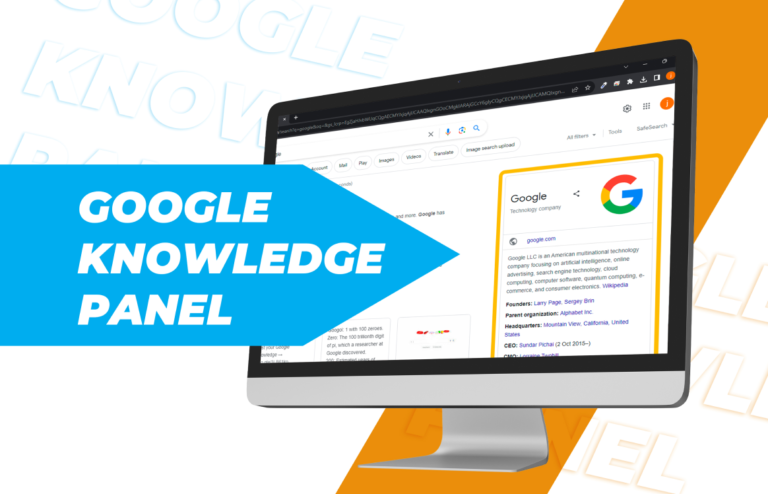
How to Obtain a Google Knowledge Panel
While Knowledge Panels are automatically created by Google, there are strategies to influence their appearance.
For Existing Knowledge Panels: If your brand already has a Knowledge Panel displayed on Google, you can easily claim it. Upon doing so, you’ll be directed to the login page of your social profiles, such as Gmail, Facebook, YouTube, and Twitter. In cases where Google faces difficulties verifying your identity, you may need to provide additional evidence, such as government-issued identification, to confirm ownership.
Once verified, you can efficiently manage users and their access by adding their email addresses. This feature also allows you to configure permission levels according to your preferences. After making these adjustments and submitting them, the involved individuals will receive email notifications about the implemented changes.
With full access to your Google Knowledge Panel, you can edit or suggest the following directly on the SERP (Search Engine Results Page):
- Featured images
- Titles and subtitles
- Descriptions
- Social media profiles
Note: The ‘Suggest Edit’ option is exclusively accessible to verified users. Non-verified users who wish to rectify information based on their personal experiences or knowledge can still provide feedback on multiple suggestions.
For Creating a New Knowledge Panel: While you cannot create a Knowledge Panel directly, you can indirectly influence Google to generate one for you.
- Create a Wikipedia Page: Wikipedia is a vital source that Google considers when creating a Knowledge Panel. Begin by setting up a Wikipedia account, adding comprehensive and accurate content representing your entity, and regularly updating the page with any changes in information.
- Maintain a Strong Social Media Presence: Ensure your entity has an active and informative social media profile. Consistency with the information provided on your Wikipedia page helps Google better understand your entity.
- Optimize Your Website: If you have a website, add structured data to convey information about your entity’s nature. Implement meta tags, descriptions, and alt tags to provide detailed information about your brand. Make sure any external links on your webpage align with the information presented on the page.
- Google My Business Listing: Engage in directory submissions and create a Google My Business listing page.
Note: Your Knowledge Panel is more likely to appear if the information presented on the internet is user-centric, authoritative, and supported by authentic user reviews.

Advantages of Having a Knowledge Panel
Obtaining a Knowledge Panel offers a significant boost to your brand’s credibility and authenticity in today’s digital age. People increasingly rely on search engines to learn about brands before establishing trust. The Knowledge Panel satisfies their curiosity by providing comprehensive information, making it a valuable component for your marketing initiatives, including rebranding, online marketing, and SEO.
It serves as a bridge connecting potential customers with your brand, empowering new audiences to make informed decisions. Ultimately, it significantly elevates and bolsters your online reputation.
| Knowledge Panel | Google Business Listing (Google Business Profile) |
|---|---|
| Offers comprehensive information and factual details about the entity. | Offers vital information, including NAP (Name, Address, Phone Number), for local businesses. |
| Provides information about recognized entities, such as brands, books, actors, and more.. | Specifically promotes local establishments, providing crucial details about local shops, restaurants, malls, and more. |
| Requires a specific search for the “entity’s name” to locate. | Appears in search results based on relevant keywords, such as “Restaurant near me.” |
| Lacks features for sharing reviews or checking map locations. | Supports interactions like adding reviews, checking opening hours, and navigating to the location using the map. |
| Knowledge panels are generated automatically, sourcing information from a variety of web-based sources. | Business owners are responsible for creating their Google Business Listings. |
In summary, Knowledge Panels provide comprehensive information about the entity, while Google Business Listings focus on local businesses.
Conclusion
Knowledge Panels are invaluable resources for converting potential audiences and increasing revenue. While obtaining one may not happen overnight, partnering with a top-tier SEO outsourcing company can expedite the process. Before embarking on the journey to create a Knowledge Panel, invest effort in establishing your brand internally. Acquiring a Knowledge Panel represents a significant milestone for your brand’s success.
Recent Post
-
 Digital Transformation for Small Businesses: A Step-by-Step Guide to Building Your Online PresenceWeb Development
 -
 How to Hire the Right Virtual Assistant for Maximum ROISEO
 -
 9 Proven Ways Blogs Can Boost Your Website SEO and TrafficSEO
 -
 Dofollow and Nofollow Links Explained: How They Impact SEOSEO
 -
 Top Tools Virtual Assistants Use to Manage Remote Work EfficientlyAdmin Support